
Insights
Analytics
The Analytics page shows delivery and engagement for a single campaign or all campaigns at once, scoped to a date range — and you can ask Aura about it in plain English. This page covers what each metric means, how it's calculated, and what the question box can answer.
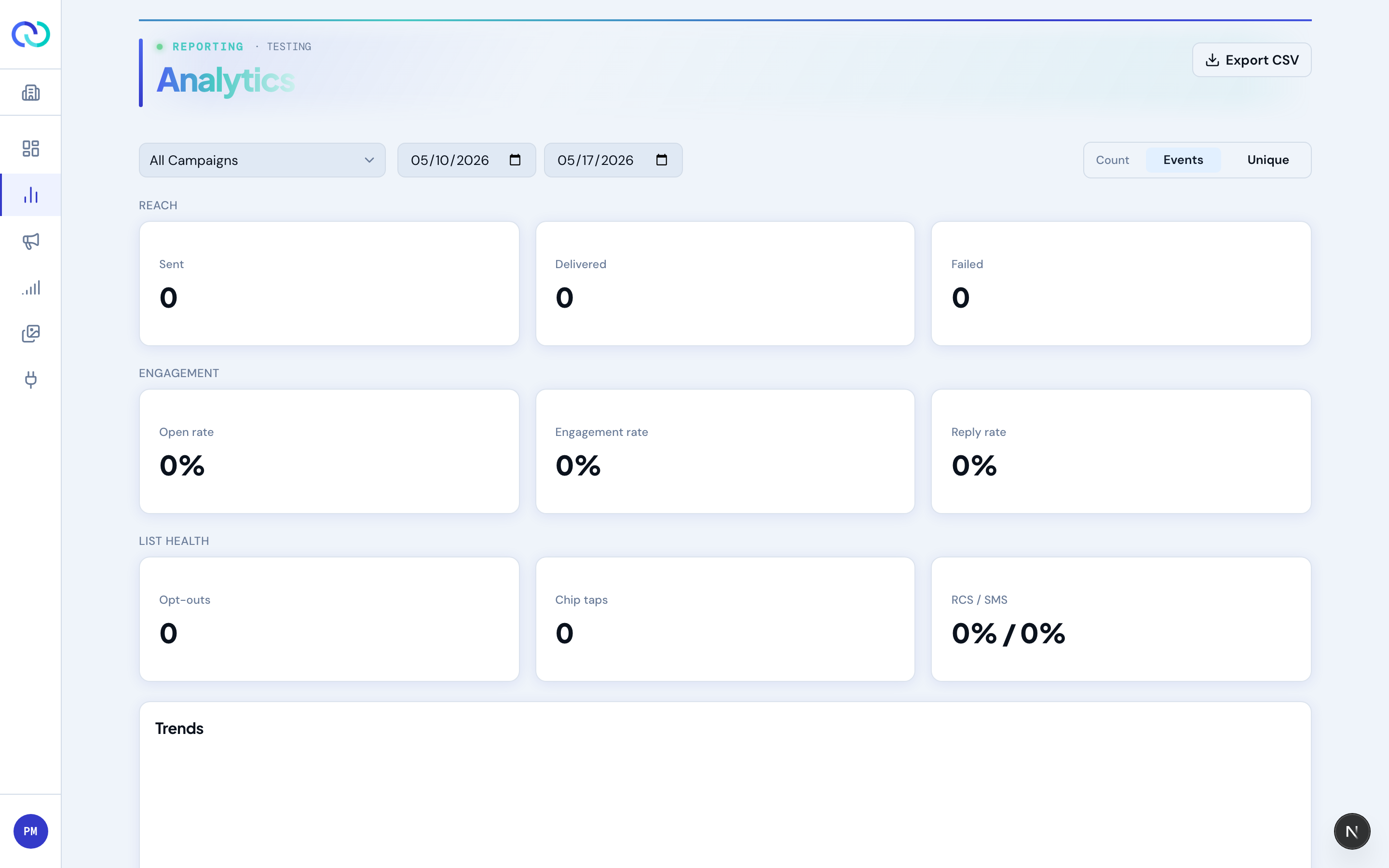
Picking what you're looking at
- Campaign selector — defaults to All Campaigns (brand-wide totals) or to the campaign you most recently opened. Pick a single campaign from the dropdown to scope the page to just that campaign.
- Date range — defaults to the last 7 days. The range applies to every metric on the page.
- Count mode toggle — “Events” counts every event (so a recipient who taps three different chips contributes three to the chip-tap count). “Unique” counts unique recipients per event type (the same recipient contributes one no matter how many chips they tap). Flip between them to tell whether engagement is broad or concentrated in a few highly active recipients.
Asking Aura about your performance
The box at the top of the page takes a question in plain English — “how did we do this week compared with last?”, “which campaign got the most engagement?”, “why did messages fail on the Labor Day send?” — and answers it in a few sentences, with the figures it used shown as cards underneath.
A question can be about one campaign or all of them. You don't have to name a campaign or a date range: a bare question is answered about whatever the page is currently showing, so if you've selected a campaign and a range, the answer covers that. Name a campaign (“the Labor Day one”) or a period (“last month”) and it uses that instead. A follow-up asked within half an hour knows what you just asked.
Where the numbers come from
Every figure in an answer is computed by the app, from exactly the same code that draws the rest of this page. Aura chooses which figures answer your question and writes the sentences around them; it never calculates a number itself. That is why an answer and the charts below it can never disagree, and why an answer will quote a rate as 12.4% rather than rounding it to “about 12%”.
What it can answer
- Delivery and engagement — for one campaign, several, or all of them, over any date range, with a comparison against the preceding period.
- Comparisons — which campaign did best on a given metric, ranked.
- Failures — why messages didn't arrive on a campaign, broken down by reason, and which numbers are worth retrying.
- Timing — how long people take to open and to engage after delivery.
- Cost — what sending cost over a window, split into messages and billable replies.
- Offers — on an Aura Offers campaign, which offer is winning and whether it has had enough decisions to trust.
It cannot change anything — it only reads. That is why a read-only analyst can use it, and why it will never edit a campaign for you. To build or change a campaign, use Draft with Aura instead.
What it costs
Each question is one Aura call, billed to your credits like any other Aura feature. If your brand is overdrawn or has hit its daily Aura cap, the box still answers — it returns the figures without the written interpretation, and says so. There is a cap of 30 questions per person per hour.
Reach metrics
Sent
The number of messages RCSync handed off to the carrier. Includes everything we tried to send, regardless of whether it landed.
Delivered
Messages the carrier confirmed reached a handset. The percentage is delivered / sent × 100. We only show the percentage when sent > 0 — a percentage with no denominator is misleading.
Failed
Messages the carrier rejected (unreachable number, blocked, etc.). Shown as a count and a percentage of sent. A small failure rate is normal; over a few percent points to a problem with the audience list.
Engagement metrics
| Metric | What counts | Formula |
|---|---|---|
| Open rate | Recipients who opened the message — a device open report (RCS), an SMS read receipt, or an email open (tracking pixel). | opens / delivered |
| Engagement rate | Recipients who took an action — a link/button click (all channels), a chip tap, or a reply. Opens are tracked separately under Open rate. | engaged / delivered |
| Reply rate | Recipients who replied (text reply or chip tap). | replies / delivered |
The Engagement card breaks the active signals out side by side: Clicks (taps on links and buttons), Chip taps (taps on a quick-reply suggestion), and Replies (free-form text, file, or location messages). Switching the page to count unique recipients deduplicates across these — a recipient who both clicked and replied counts once toward engagement.
Engagement funnel
The funnel shows how recipients move through the stages — Targeted → Sent → Delivered → Opened → Engaged — with the conversion from the previous stage shown beside each band. Targeted is the recipients on your list before the pre-send filter removed opt-outs, invalid numbers, and frequency-capped contacts, so the gap down to Sent is how many were filtered out before delivery. Engaged is any recipient who took an action: a click, a chip tap, or a reply. The funnel follows the Count toggle — in Events mode each stage counts events; in Unique mode it counts distinct recipients, which is the clearer view for reading true drop-off.
Timing
Two timing metrics measure how quickly recipients act after a message reaches them:
- Time to open — from delivered to the first open.
- Time to engage — from delivered to the first action (click, chip tap, or reply).
The headline figure is the median — the typical recipient, resistant to a few very-late stragglers. The detail line adds the average, fastest (min), slowest (max), and 95th percentile. The distribution chart buckets time-to-open so you can see whether opens cluster in the first minutes or trail off over hours; its columns tighten automatically to fit the data, so a campaign whose opens all land within a few minutes shows minute-scale columns instead of one tall bar. Opens inferred from a reply (when the device never sent an explicit open) are included.
Cost
The Cost card shows actual spend to date for the current selection: outbound sends plus the inbound replies they generated. Replies — suggestion-reply taps and free-text, file, or location messages — are billed at the same rate the campaign paid to send, since each inbound message carries a cost. Link and button clicks aren't billed: tapping a URL doesn't send a message back. The breakdown splits the total into outbound sends and replies. Per-message rates can be configured below a cent, but this total is shown to the nearest cent, rounded up. If pricing hasn't been configured for your brand, the card shows a dash.
List health
- Opt-outs — recipients who replied
STOP, or (on email) unsubscribed, within the window. The percentage isoptOuts / delivered. Color-coded muted under 0.5%, amber 0.5%–2%, red 2%+. - Engagement — clicks, chip taps, and replies at a glance (see Engagement metrics above). The Reply options table breaks chip taps down by which button was tapped.
- RCS / SMS split — proportion of the audience that received the RCS message vs. the SMS fallback. A high SMS share usually means your audience contains a lot of non-RCS handsets.
- Complaint rate (email only) — recipients who marked the email as junk, as a share of delivered. Mailbox providers treat this as the strongest negative signal there is; anything sustained above a fraction of a percent will start pushing your mail to spam.
What email campaigns show instead
An email campaign's analytics are the same page with the channel-specific pieces swapped out. Cards that could never have data for email are hidden rather than shown empty:
- Hidden — chip taps, replies, and the RCS / SMS split. Email has no suggestion chips, no inbound reply capture, and no fallback channel.
- Added — the complaint rate described above.
- Failed includes hard bounces, and they appear in the troubleshooting breakdown as their own reason. A hard bounce also suppresses the address for future sends — see Governance & compliance.
- Engagement for email means clicks — a tap on any link in the body, including ones inside images.
Trends charts
The Trends section has two charts, both covering your selected date range and bucketed in your local time zone (the one set on your profile) rather than UTC:
- Delivery volume — sent versus delivered, as bars.
- Engagement over time — opens and interactions as smooth lines. Opt-outs are plotted against a separate scale on the right edge of the chart; they're far smaller in number than opens, so giving them their own axis keeps them readable instead of flattened along the bottom.
When the data covers a short window (up to about two days) the charts bucket by hour, so you can see the shape of a single send; over longer ranges they bucket by day. Use them to spot bursts (a recurring campaign) or compare runs across the window.
Exporting to CSV
The Export CSV button (top right) downloads the raw events behind the page, scoped to the selected campaign and date range. The file is event-grain: one row per event, not one row per recipient or per metric tile. The same recipient typically appears multiple times — once for sent, once for delivered, and once more for any reply or chip tap.
Columns
| Column | Description |
|---|---|
| brand | Brand display name. |
| campaign_id | Stable UUID for the campaign. Use this as your join key — names can change. |
| campaign_name | Display name at the time of export. |
| run_id | UUID of the campaign run that produced this event. Important for recurring campaigns where one campaign has many runs. |
| run_number | Sequential number of the run within the campaign (1, 2, 3…). Easier to read than run_id. |
| event_type | One of sent, delivered, failed, opened, click, chip_tapped, text_reply, file_reply, location_reply, opted_out, typing, and — for email — bounced (hard bounce) and complaint (spam report). typing is a fuzzy “is composing” signal and is excluded from the headline engagement metrics. |
| channel | rcs, sms, or email. Tells you which path the message took. |
| event_timestamp | When the event happened on the recipient side (or carrier side, for sent/delivered/failed). ISO-8601 UTC. |
| received_at | When RCSync received notification of the event. ISO-8601 UTC. Use this for ingestion lag analysis. |
| recipient_hash | SHA-256 hash of the phone number — or, on an email campaign, of the email address. Stable per recipient within a brand. Use it to group events by person without exposing the phone or address. |
| idempotency_key | Carrier-supplied dedupe key. Same key across rows means the same underlying event. |
| postback_data | For chip_tapped events, the payload value attached to the tapped button (e.g. redeem, later). Empty for other event types. |
What you can do with it
- Unique-recipient counts by event type — group by
recipient_hashandevent_typein your sheet or notebook. (The page's “Unique” toggle does this for you for the headline metrics; the CSV lets you do it for any slice.) - Funnel analysis — for each
recipient_hash, check whetherdeliveredwas followed bychip_tappedor a reply. Tells you who's engaging. - Per-run comparison for recurring campaigns — group by
run_numberto see whether each run is performing better or worse than the last. - Time-of-day analysis — bucket
event_timestampby hour to see when your audience is most likely to engage. - Quick-reply breakdown — filter to
event_type = chip_tappedand group bypostback_datato count taps per option. Useful for surveys and lead routing. - Channel mix per recipient — group by
recipient_hashand countchannelvalues. Recipients consistently falling back to SMS may not be on RCS-capable devices. - Reconciliation — join
idempotency_keyagainst your downstream system (CRM, data warehouse) to confirm every event flowed through.